
Available Shortcodes and Uses
The User Registration & Membership plugin comes with a full set of shortcodes that let you add registration, login, and account management features anywhere on your site.
Last updated on Jul 17, 2026
You can place these shortcodes in pages, posts, widgets, or theme templates to display forms, member areas, and other membership-related content.
For example, adding [user_registration_form id="form_id"] to any page will display the registration form that matches the form ID you enter.
This article lists every shortcode available in the plugin, explains what each one does, and shows you how to use it with examples.
Access Path
User Registration & Membership → Dashboard → Help → Shortcodes
Accessing the Shortcodes List
You don't need to memorize any shortcode. The plugin keeps a full, searchable list inside your WordPress admin so you can copy exactly what you need.
Go to User Registration & Membership in your WordPress admin menu.
Navigate to Dashboard → Help.
Click View all Shortcodes under the Shortcodes section.
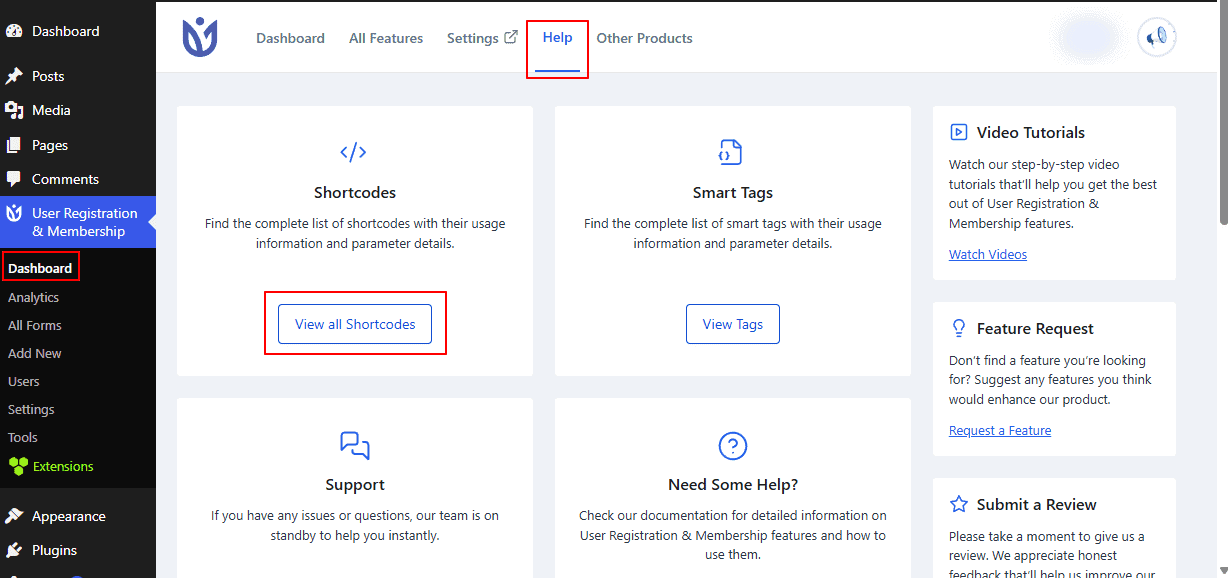
You'll now see every available shortcode listed inside the plugin.
Click the copy icon next to any shortcode to copy it instantly.
Click the + icon next to a shortcode to view more details about it.
Once copied, paste the shortcode into a Shortcode block on any page or post.
You do not need to type shortcodes from memory. Copying them directly from the admin panel helps avoid typos, which is the most common reason a shortcode doesn't work.
Shortcodes at a Glance
# | Shortcode | Purpose | Availability |
|---|---|---|---|
1 |
| Displays a registration form | Free |
2 |
| Displays a login form | Free |
3 |
| Displays the My Account page | Free |
4 |
| Displays the edit profile form | Free |
5 |
| Displays the change password form | Free |
6 |
| Displays a read-only profile view | Pro |
7 |
| Displays a registration popup | Pro |
9 |
| Displays a member directory | Pro |
10 |
| Displays a PDF download button | Pro |
11 |
| Displays membership plans | Free |
12 |
| Displays a membership thank you message | Free |
1. User Registration & Membership Form
Shortcode:
[user_registration_form id="your_form_id"]This shortcode displays a registration form on the front end so visitors can sign up on your site.
Parameters:
Parameter | Required | Description |
|---|---|---|
| Yes | The ID of the form you want to display. |
The id parameter must always be included. You can find the form ID from your User Registration & Membership → Registration Forms list in the admin dashboard.
2. User Login Form
Shortcode:
[user_registration_login]This shortcode displays a login form on the front end, allowing users to sign in and access restricted content or member areas.
Parameters:
Parameter | Required | Description |
|---|---|---|
| No | The page slug or URL users are redirected to after logging in. |
Examples:
[user_registration_login redirect_url="sample-page"]Displays the login form and redirects users to the page with the slug "sample-page" after login.
[user_registration_login redirect_url="https://wpuserregistration.com"]Displays the login form and redirects users to the specified external URL after login.
For a full walkthrough, see our documentation on redirecting users after login.
3. My Account Page
Shortcode:
[user_registration_my_account]This shortcode creates a dynamic account page. Logged-in users see account management options, while logged-out visitors see a login form instead.
Parameters:
Parameter | Required | Description |
|---|---|---|
| No | The registration form shown alongside the login form for new sign-ups. |
| No | The page users are taken to after logging in. |
| No | The page users are taken to after logging out. |
Examples:
[user_registration_my_account form_id="5"]Creates a combined login and registration page using form ID 5, so existing users can sign in and new users can register from the same page.
[user_registration_my_account redirect_url="dashboard" logout_redirect="homepage"]Sends users to the "dashboard" page after login and back to the homepage after logout.
For more detail, see our documentation on showing the login and registration form together.
4. Edit Profile Form
Shortcode:
[user_registration_edit_profile]This shortcode displays a profile editing page, letting logged-in users update their account information and personal details.
Parameters:
This shortcode doesn't take any parameters. It works right out of the box.
The user must be logged in to view or use this page.
5. Change Password Form
Shortcode:
[user_registration_edit_password]This shortcode displays a secure password change form, letting logged-in users update their password with built-in validation.
Parameters:
This shortcode doesn't take any parameters.
Example:
[user_registration_edit_password]Displays fields for the current password and new password confirmation, so users can safely update their credentials.
6. Profile Details View Pro
Shortcode:
[user_registration_view_profile_details]This shortcode displays a read-only view of the logged-in user's profile and registration details.
Parameters:
This shortcode doesn't take any parameters. It automatically shows the currently logged-in user's information.
Example:
[user_registration_view_profile_details]Displays all profile and registration details for the logged-in user in a formatted, view-only layout.
7. Registration Popup Pro
Shortcode:
[user_registration_popup]This shortcode displays a registration form inside a popup modal, letting visitors sign up without leaving the current page.
Parameters:
Parameter | Required | Description |
|---|---|---|
| Yes | The ID of the popup to display. |
| No | Controls how the popup is triggered — automatically on page load, or through a button click. |
Examples:
[user_registration_popup id="1"]Displays the popup automatically when the page loads. You can find the popup ID under User Registration & Membership → Settings → Misc → Popups.
[user_registration_popup type="button"]Displays a clickable button that opens the popup when clicked, giving visitors control over when they see the form.
8. Frontend User ListingPro
Prerequisite: The Frontend Listing addon must be installed to create a listing.
Shortcode:
[user_registration_frontend_listing id="1"]This shortcode displays a member directory on the front end, letting visitors browse registered users based on your configured display settings.
Parameters:
Parameter | Required | Description |
|---|---|---|
| Yes | The Frontend Listing ID that determines which directory configuration to display. |
You can find the listing ID under the Frontend List tab. Once added, the shortcode displays your configured member directory, which you can further customize from the same settings tab.
9. PDF Download ButtonPro
Prerequisite: The PDF Form Submission addon must be installed and activated.
Shortcode:
[user_registration_download_pdf_button]This shortcode displays a button that lets logged-in users generate and download a PDF of their registration and form submission data — useful for receipts, certificates, or personal records.
Parameters:
This shortcode doesn't take any parameters. It automatically generates the PDF using the user's registration information.
Example:
[user_registration_download_pdf_button]Shows a download button that only appears after a user logs in.
10. User Groups
Shortcode:
[user_registration_groups]This shortcode displays a list of available membership plans or subscription options from a membership group.
Parameters:
Parameter | Required | Description |
|---|---|---|
| No | The ID of the membership group to display. |
| No | Custom text for the signup button. |
Example:
[user_registration_groups id="5" button_text="Join Now"]Displays membership group ID 5 with a "Join Now" button instead of the default text.
11. Membership Thank You
Shortcode:
[user_registration_membership_thank_you]This shortcode displays a customized thank you message after a user successfully completes a membership registration or paid subscription.
Parameters:
This shortcode doesn't take any parameters. It shows the default thank you message from your membership settings.
You can also build a fully custom thank you page using the Thank You block.
Wrapping Up
You now have a complete reference for every shortcode the User Registration & Membership plugin offers — from basic registration and login forms to Pro features like popups, content restriction, and member directories. Copy any shortcode from the admin panel's Shortcodes list, paste it into a Shortcode block on your page or post, and adjust the parameters to fit your setup.