
Sharing System Info for Troubleshooting
Last updated on Oct 14, 2026
When contacting our support, you may be asked to share your System Info.
System Info provides a comprehensive snapshot of your WordPress environment, plugin setup, and server configuration.
This helps us identify compatibility issues, configuration conflicts, or server limitations without needing access to your site, which significantly speeds up troubleshooting.
Why Support Requests System Info
Sharing System Info allows us to:
Identify WordPress, plugin, and theme compatibility issues
Detect missing or misconfigured required pages
Check server limits that may affect performance or features
Reduce back-and-forth questions during troubleshooting
Resolve issues faster without requesting admin access
Where to Find System Info
From your WordPress dashboard:
Go to User Registration & Membership → Settings → Tools → System Info
The System Info screen opens.
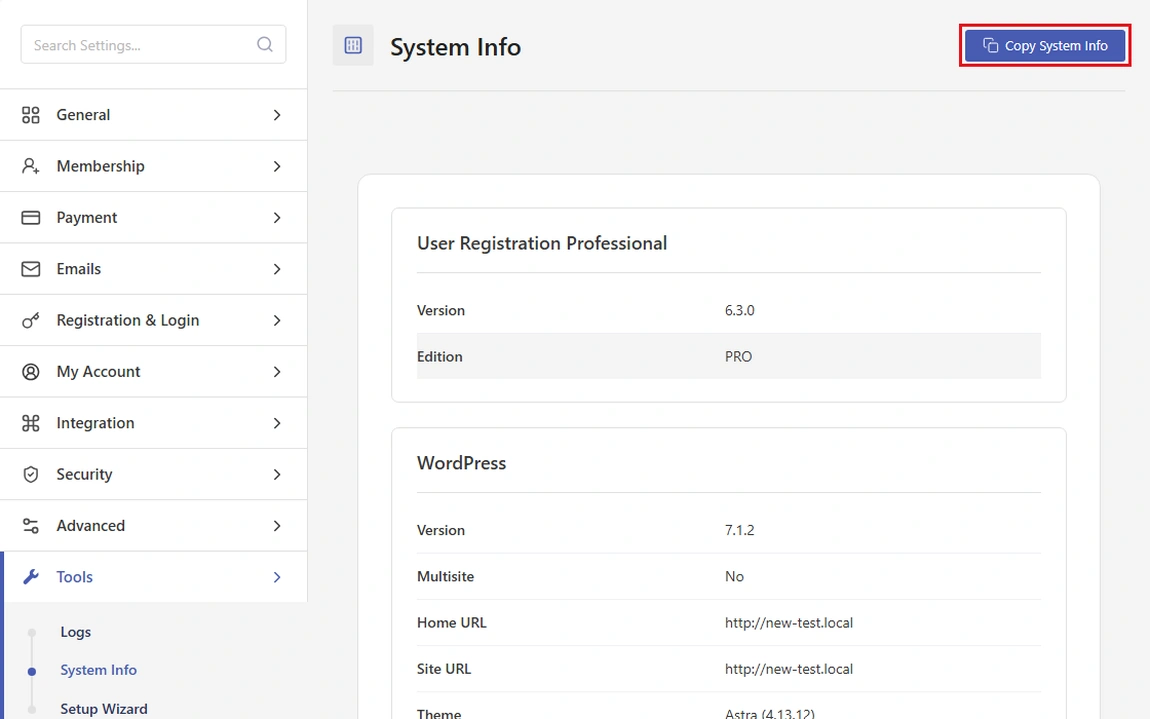
How to Copy System Info
At the top-right corner of the System Info screen, you’ll see the Copy System Info button.
Click Copy System Info
The full system report is copied to your clipboard
Paste it directly into your support ticket or email
No formatting is required. Just paste it as plain text.
What Information Is Included
The System Info panel includes the following sections:
Plugin and Site Details
User Registration and Membership version
WordPress version and multisite status
Home URL and Site URL
Active theme and plugin versions
Server and PHP Configuration
PHP version and timezone
Memory limit and execution time
Upload limits and input variable limits
SMTP hostname and port
Web Server and Database
Server name and IP address
MySQL version and packet size
Required Pages Status
Login page
Lost password page
Reset password page
My Account page
Membership registration page
Thank You page
This allows us to quickly confirm whether required pages are missing, misconfigured, or unpublished.
Is This Information Safe to Share?
Yes. The System Info output:
Does not include passwords or private user data
Does not expose admin credentials
Is used strictly for debugging and support purposes
You can safely share it with our support team.
When to Include System Info
We recommend sharing System Info when:
Opening a new support ticket
Reporting bugs or unexpected behavior
Facing membership access, payment, or email issues
Troubleshooting issues after updates
Including it upfront helps us assist you faster.