
Fix “Registration Disabled” Error
Fix the "Registration Disabled" error by enabling WordPress's "Anyone can register" setting required for User Registration & Membership 5.2.6+.
Last updated on Aug 7, 2026
Overview
Starting from version 5.2.6, User Registration & Membership requires WordPress's built-in Anyone can register setting to be turned on. In earlier versions, the plugin managed registration access internally and allowed sign-ups even when this setting was off. This was changed for security reasons.
If this setting is turned off, guest visitors won't see your registration form. Instead, they'll see a message saying that registration is currently disabled.
What Is “Anyone Can Register”?
Anyone can register is a native WordPress setting, not a setting inside User Registration & Membership. It controls whether visitors can create new accounts on your site at all.
When this setting is turned off, WordPress blocks all new sign-ups site-wide, including through the User Registration & Membership form.
As of version 5.2.6, the plugin checks this setting before showing the registration form. If it's off, the form won't display, and visitors will see a disabled message instead.
This setting is sometimes turned off by accident, whether through a theme change, another plugin, or a manual site cleanup. If your registration form suddenly stopped working after updating the plugin, this setting is the most common cause.
Access Path
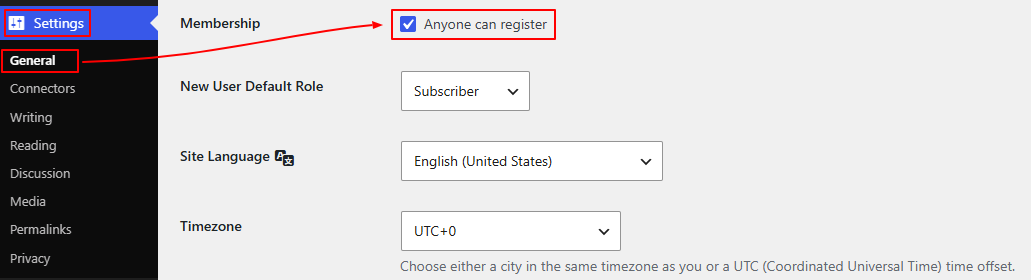
WordPress Dashboard → Settings → General
Step-by-Step Instructions
Go to Dashboard → Settings → General.
Scroll down to the Membership section.
Check the box next to Anyone can register.
Click Save Changes.
Visit your registration page again to confirm the form now appears correctly.
Still Seeing the Error?
If the form still doesn't appear after enabling Anyone can register and saving, try these next steps:
Clear your site's cache (and any caching plugin's cache) so the updated form isn't served from an old cached version.
Check for a conflicting plugin or theme that may be overriding this setting again after you save it.
Confirm you're editing the correct site if you're running a multisite network, as this setting is configured per site.
If none of these help, contact our support team with your System Info details so we can look into it further.