
Strong Password Requirements
Require users to create passwords that meet minimum complexity standards before they can complete registration and create an account.
Last updated on Sep 3, 2026
Overview
Weak passwords make user accounts easier to compromise. User Registration & Membership lets you enforce password complexity rules on your registration form, so new users are required to create a password that meets a minimum strength level before their account can be created.
Once enabled, users won't be able to submit the registration form with a password that doesn't meet your chosen requirements. They'll see a message explaining what's missing until they fix it.
What Is Password Strength Level?
Password strength level determines how complex a user's password must be. User Registration & Membership offers five options:
Very Weak
Weak
Medium
Strong
Custom
The first four are preset levels — each one applies a different combination of length and character-type rules, ranging from very permissive (Very Weak) to strict (Strong). When you select a level, the exact requirement for that level appears as a hint below the option. For example, selecting Strong shows:
Minimum one uppercase letter, a number, a special character, must be 9 characters and no repetitive words or common words.
Custom lets you build your own rule from scratch instead of using a preset, giving you full control over exactly what a password must contain.
Access Path
User Registration & Membership → Edit Registration Form → Form Settings → GeneralStep-by-Step Instructions
Go to User Registration & Membership → Registration Forms.
Click on the form you want to edit.
In the form builder, click the Form Settings tab.
Select General from the settings menu.
Toggle on Require Strong Password.
Under Minimum Password Strength, choose a level: Very Weak, Weak, Medium, Strong, or Custom.
If you chose Custom, configure the additional fields that appear (see below).
Click Update Form to save your changes.
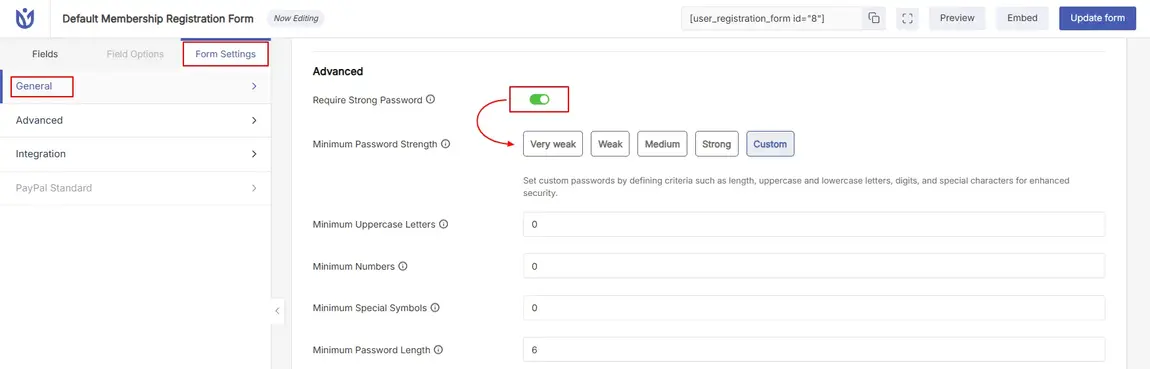
Explain Individual Options
Require Strong Password
Turn this toggle on to enforce password complexity rules on this form. When it's off, users can register with any password, regardless of strength.
Minimum Password Strength
Choose how strict the password requirement should be. Selecting one of the preset levels (Very Weak, Weak, Medium, or Strong) instantly applies that level's built-in rule — no further configuration needed.
Level | Description |
|---|---|
Very Weak | Applies the most permissive password rule. Good for low-risk sites where convenience matters more than security. |
Weak | Applies a light complexity rule, stricter than Very Weak. |
Medium | Applies a moderate complexity rule, balancing security and ease of use. |
Strong | Requires at least one uppercase letter, a number, a special character, a minimum of 9 characters, and avoids repetitive or common words. |
Custom | Lets you define your own combination of requirements instead of using a preset. |
Custom Password Requirements
When you select Custom, four additional fields appear so you can define your own password rule:
Field | Description |
|---|---|
Minimum Uppercase Letters | The minimum number of uppercase letters (A–Z) required in the password. |
Minimum Numbers | The minimum number of digits (0–9) required in the password. |
Minimum Special Symbols | The minimum number of special characters (for example, !, @, #, $) required in the password. |
Minimum Password Length | The minimum total number of characters required in the password. |
Set these values based on your site's security needs. Higher values create stronger passwords but may frustrate users if set too high.
Closing Section
That's it! After completing the above steps, your registration form will enforce the password strength rule you selected, so every new user is required to create a password that meets your site's security standard.