
Set Admin Approval on Top of the Email Confirmation Option for Registering a User
Learn how to configure a two-step user verification process requiring both email confirmation and admin approval before granting site access.
Last updated on Jul 17, 2026
Would you like to add an extra layer of control to your user registration process? User Registration & Membership allows you to require both email verification and admin approval before users can access your site. This tutorial will show you how to configure this two-step approval workflow.
Before getting started, make sure you've installed and activated the User Registration & Membership plugin on your WordPress site.
Understanding the Two-Step Approval Process
When you enable admin approval on top of email confirmation, users go through a two-step verification process:
User submits the registration form
User receives an email with a verification link
User clicks the verification link to confirm their email address
Admin receives a notification to approve the user
Admin approves the user from the WordPress dashboard
User can now log in and access the site
This workflow ensures that only users with verified email addresses reach your approval queue, and only approved users gain access to your site.
Configuring the Form Settings
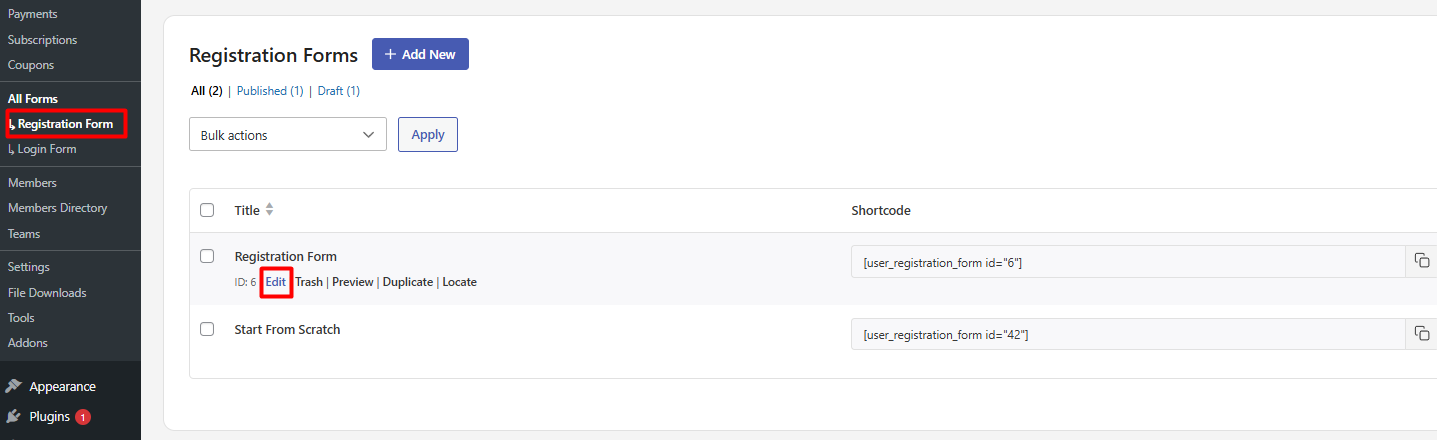
To set up admin approval after email confirmation, go to User Registration & Membership > Registration Form. (All Forms > Registration Form > Edit/Add New if you have the multiple registration add-on enabled.)
Once you're in the form builder, navigate to Form Settings > General. Here, you'll see the User Approval and Login Option setting on the right side of the screen.
From the User Approval and Login Option dropdown, select Admin approval after email confirmation. By default, this setting is configured to require email confirmation before admin approval.
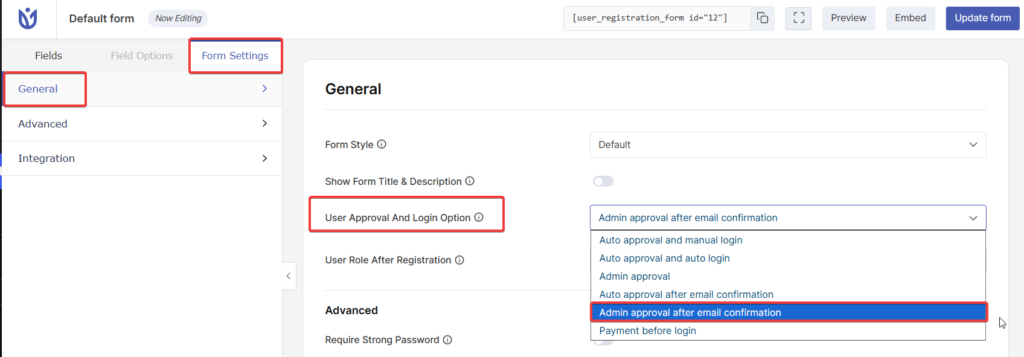
Click Update form to save your changes.
Make sure you do not have a membership block in your registration form for this feature to work.
Frequently Asked Questions
These are answers to some of the most common questions we receive about admin approval after email confirmation.
Can users log in before admin approval?
No. When admin approval is enabled, users cannot log in until an administrator approves their registration from the WordPress dashboard, even after they verify their email address.
What happens if a user doesn't verify their email?
If a user doesn't click the verification link in their email, they will not appear in your approval queue. Only users who complete email verification will be sent to the admin for approval.
Do I receive notifications when users verify their email?
Yes. When a user verifies their email address, you'll receive an admin notification that the user is ready for approval.
That's it! Now you know how to set up admin approval after email confirmation for your registration forms. Next, would you like to customize the email templates sent to users during the approval process? Be sure to check out our guide on customizing registration email templates for all the details.