
Replace the WordPress default login page
Learn how to disable WordPress's default login page and redirect users to a custom User Registration login form using the plugin's advanced settings.
Last updated on Jul 14, 2026
Would you like to replace WordPress's default login page with a custom User Registration login form? User Registration & Membership allows you to disable the standard WordPress login screen and redirect users to your custom login page instead. This tutorial will show you how to hide the default WordPress login and set up your User Registration login page.
Before getting started, make sure you've installed and activated the User Registration & Membership plugin on your WordPress site. Then, make sure you've created a My Account page with the [user_registration_my_account] shortcode.
Disabling the Default WordPress Login Screen
To configure your login redirect settings, go to User Registration & Membership → All Forms → Login Form → Form Settings → Advanced.
Here, you'll find the settings that control how WordPress handles login page access.
Once you're in the Advanced settings, find the Disable Default WordPress Login Screen option.
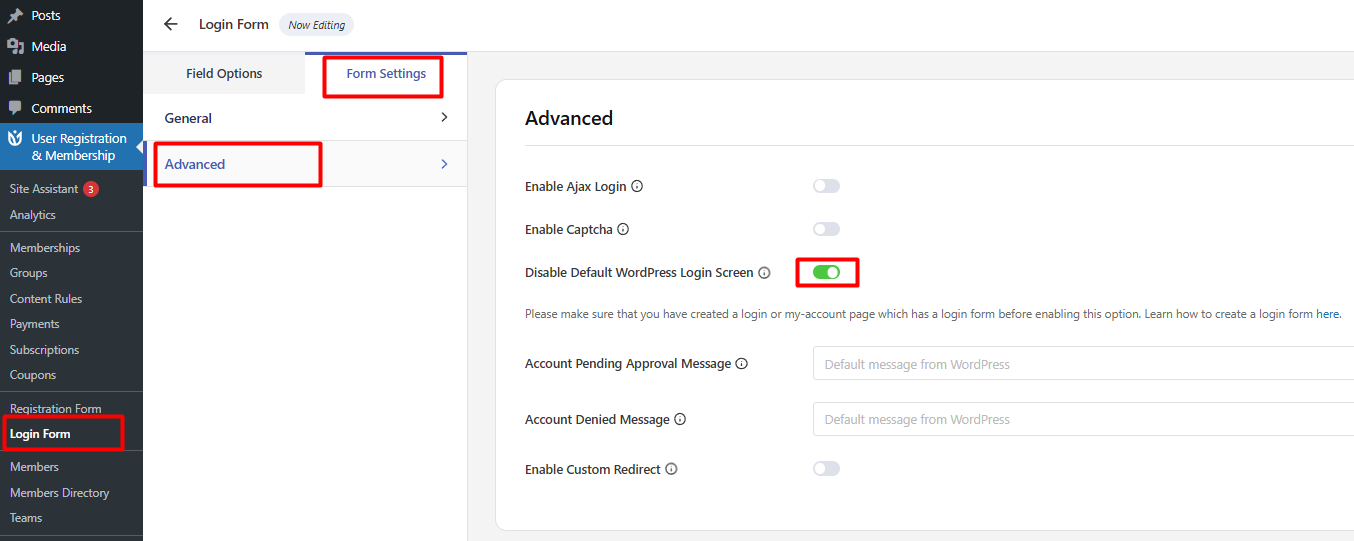
Check this option to hide the default WordPress login page. When enabled, users who try to access the standard WordPress login URL (/wp-login.php) will be automatically redirected to your custom login page instead.
Please make sure that you have created a login or my-account page which has a login form before enabling this option.