
License Activation
Learn how to activate your User Registration & Membership Pro license key to unlock premium features, membership plans, and advanced add-ons.
Last updated on Jul 14, 2026
Would you like to unlock premium features and add-ons for User Registration & Membership? User Registration & Membership Pro allows you to activate your license key to access advanced functionality including membership plans, payment processing, content restriction, and premium add-ons. This tutorial will show you how to activate your license key and verify your subscription.
Before getting started, make sure you've installed and activated the User Registration & Membership Pro plugin on your WordPress site. Then, make sure you have your license key from your WPEverest account.
Locating Your License Key
To activate your license, you'll need to retrieve your license key from your WPEverest account. Go to your WPEverest account dashboard and navigate to the License Keys tab. Here, you'll see your license key displayed. Copy this key to your clipboard.
Activating Your License in WordPress
From your WordPress dashboard, go to User Registration & Membership > Settings. Click on the License tab to access the license activation settings.
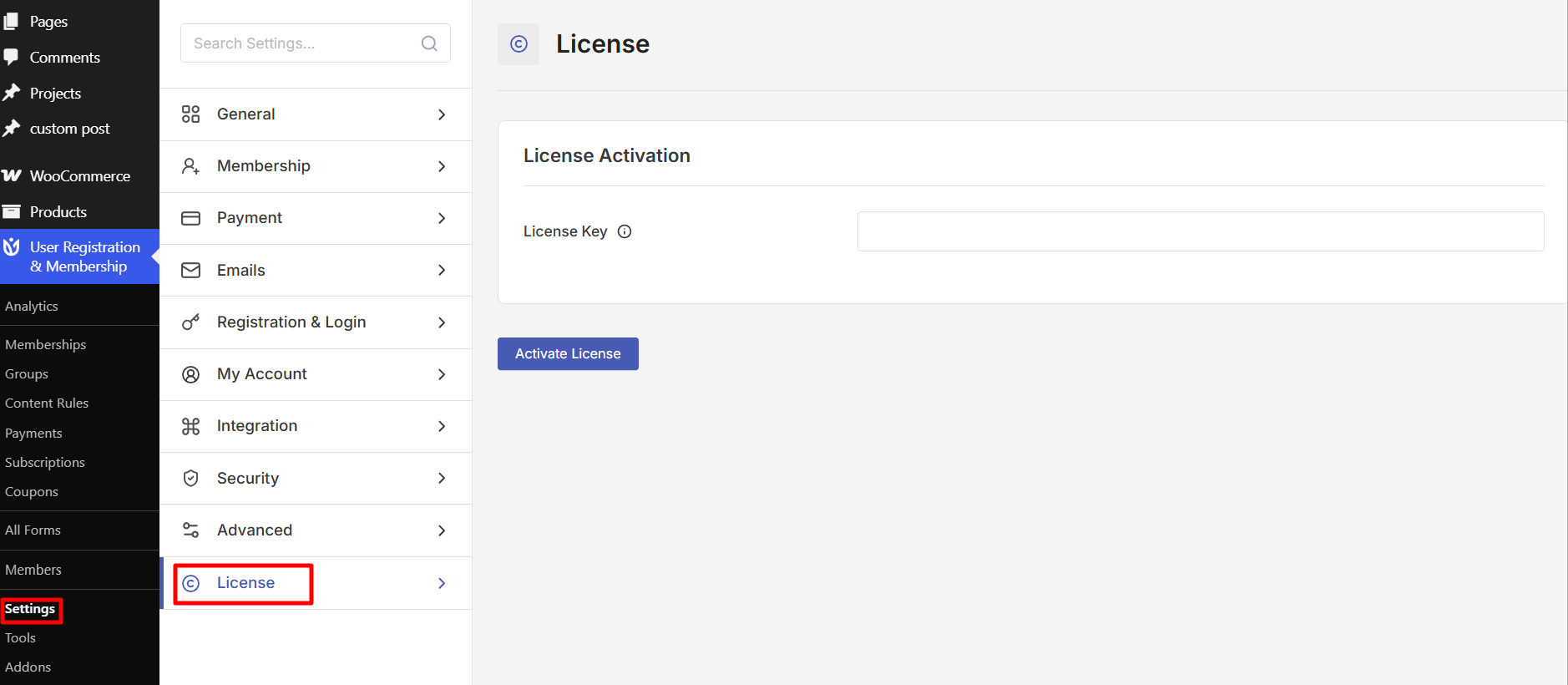
In the License Activation section, paste your license key into the provided field. Click the Activate License button to complete activation. Once activated, you'll see a success message confirming your license is active.
Verifying Your License Status
Once your license is active, you can access premium features and add-ons. Navigate to User Registration & Membership > Addons to view and activate available add-ons included in your plan. Your license status will be displayed in the License tab, showing whether your subscription is active or expired.
Frequently Asked Questions
Where can I find my license key?
Log in to your WPEverest account and go to the License Keys tab. Your license key will be displayed there for you to copy.
What happens if my license expires?
When your license expires, you'll lose access to plugin updates and support. Your existing features will continue to work, but you won't receive new features, security patches, or technical assistance until you renew your subscription.
Can I use my license on multiple sites?
License usage depends on your purchased plan. Check your plan details in your WPEverest account to see how many sites your license covers.
How do I upgrade my license plan?
You can upgrade to a higher plan at any time. Upgrades are available at a prorated price, meaning you only pay the difference between the plans. Contact support or visit your WPEverest account to upgrade.
That's it! Now you know how to activate your User Registration & Membership Pro license. Next, would you like to explore the premium add-ons available with your plan? Be sure to check out our guide on activating and configuring add-ons for more details.