
Advanced Settings
Configure data migration, plugin deletion behavior, user activity tracking, and privacy controls for User Registration & Membership.
Last updated on Jul 15, 2026
The Advanced Settings section provides tools for managing data import and export, configuring plugin deletion behavior, tracking user activity, and controlling privacy options.
Import and Export
User Registration & Membership allows you to import users, export member data, and transfer forms between sites.
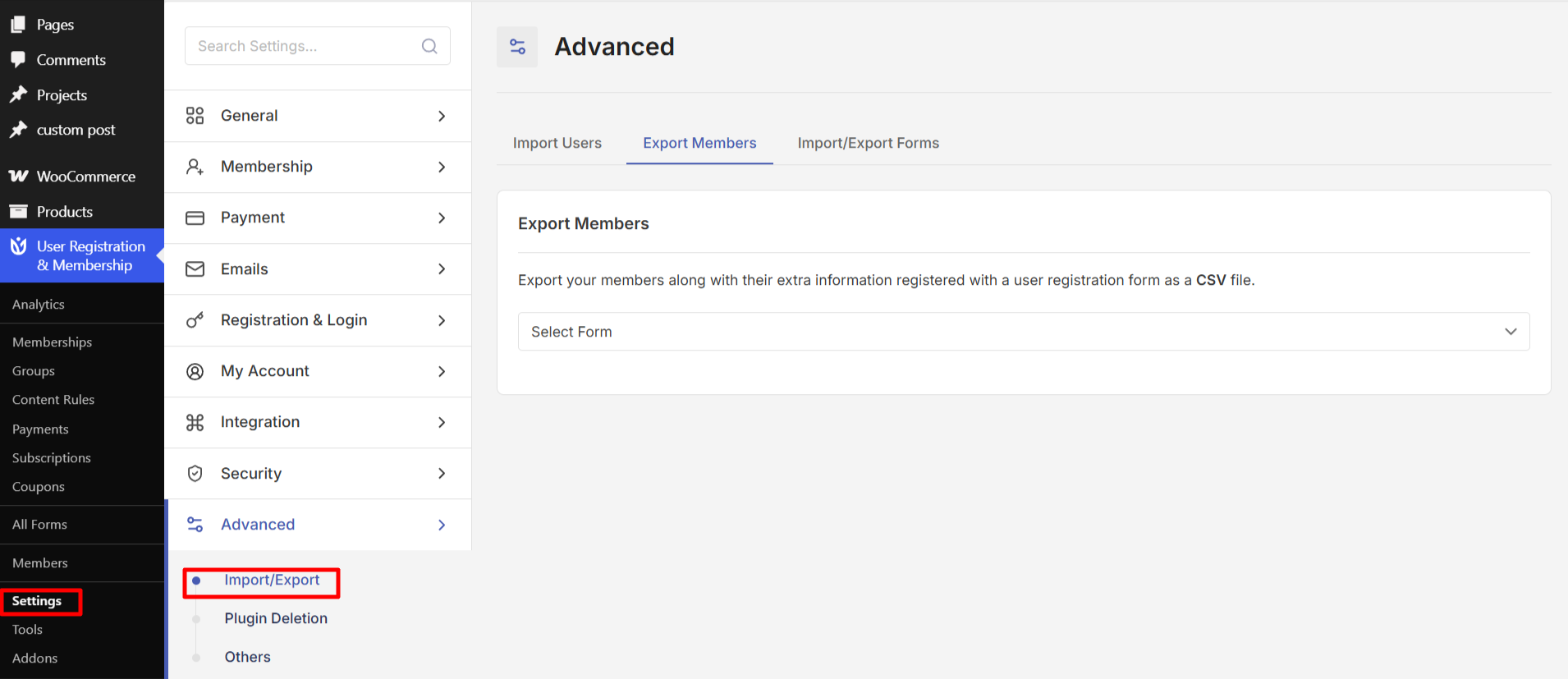
Import Users
Import users from external sources or other registration systems into User Registration & Membership. This feature helps you migrate existing user data without losing information.
Export Members
Export member data from your site for backup, analysis, or migration purposes. The exported data includes user information collected through your registration forms.
Import and Export Forms
Transfer registration forms between sites or create backups of your form configurations. You can export forms with all their settings and import them on the same site or a different WordPress installation.
Plugin Deletion
Control what happens to your data when you uninstall User Registration & Membership.
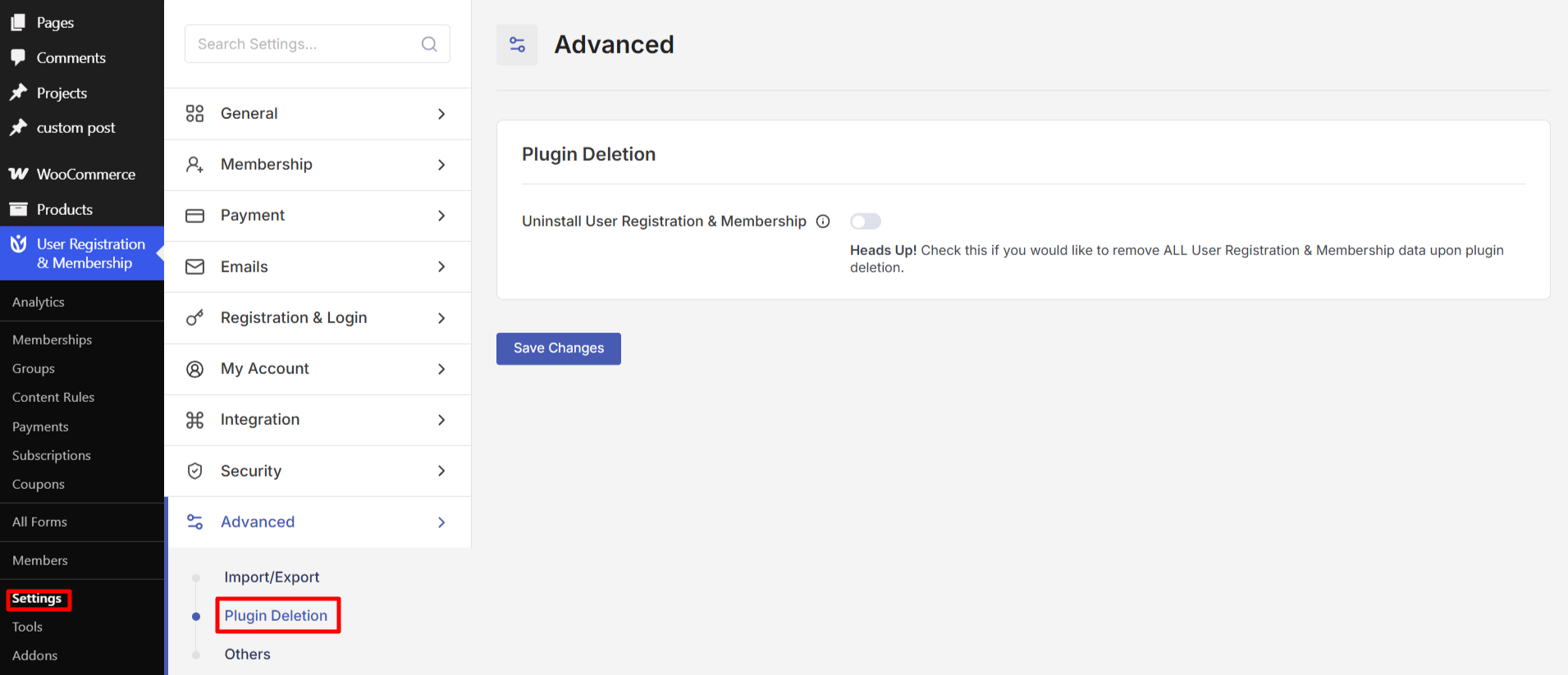
Uninstall User Registration & Membership
When enabled, this option permanently deletes all User Registration & Membership plugin data from your database when you uninstall the plugin. This includes forms, user data, settings, and all associated information.
Enabling this option means all plugin data will be lost upon uninstallation. Only enable this if you are certain you want to completely remove all traces of the plugin from your site.
Others
Additional settings for tracking, logging, webhooks, and user activity monitoring.
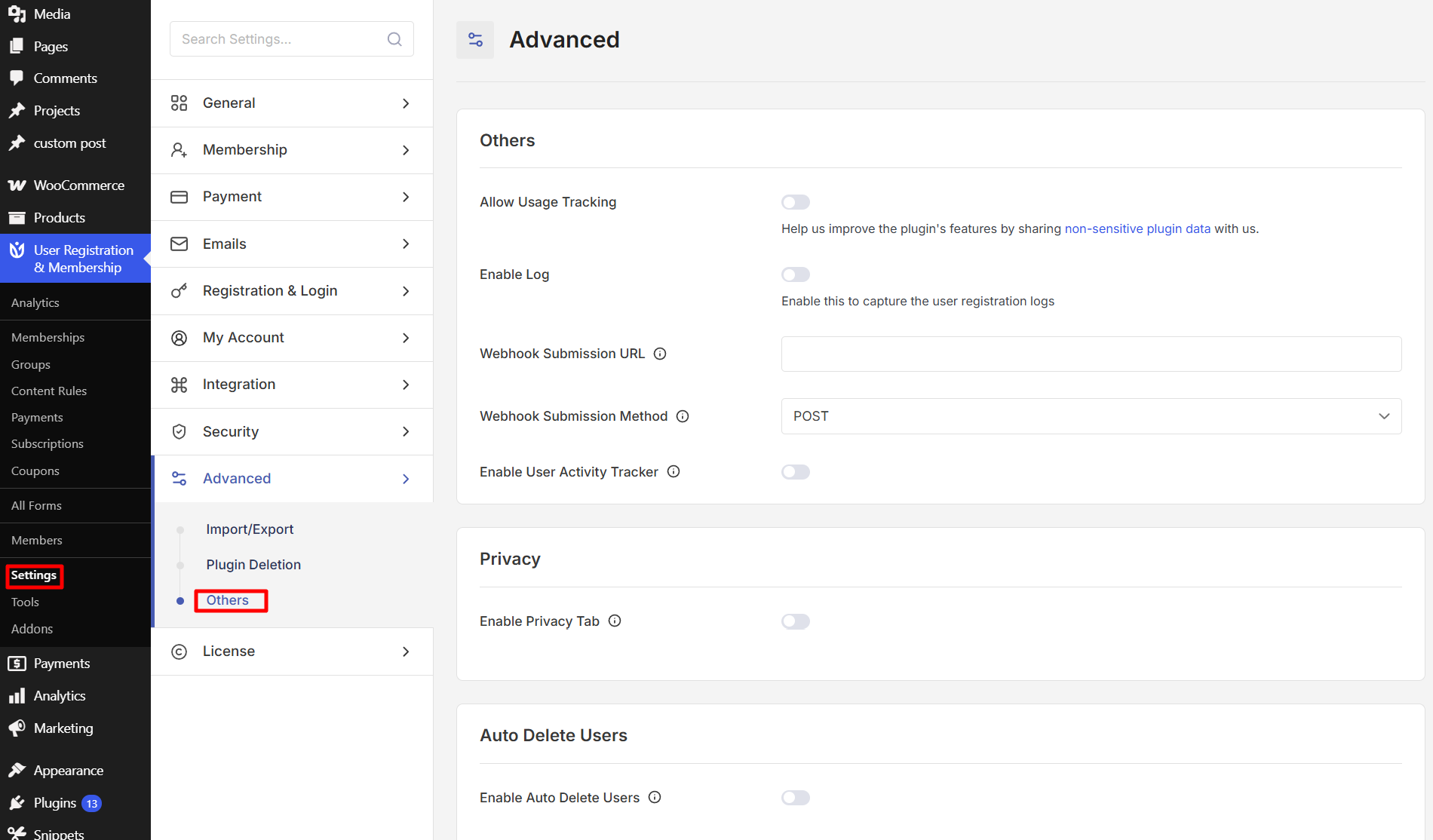
Allow Usage Tracking
Help improve the plugin by sharing non-sensitive diagnostic information with the development team. When enabled, the plugin collects data about your WordPress environment, plugin usage, and site configuration to help identify compatibility issues and improve features.
The collected data is never shared with third parties and is used only for compatibility testing and feature development. Users who enable usage tracking may receive occasional emails about new features and security updates.
Enable Log
Capture user registration logs for troubleshooting and monitoring purposes. When enabled, the plugin records all user registration and membership activities including registration attempts, payment status, and errors.
Logs help you track registration attempts, identify issues, and monitor user activity. You can view logs by going to User Registration & Membership → Tools → Logs.
Webhook Submission
Send newly registered user data to a custom URL endpoint using webhooks. This feature allows you to integrate User Registration & Membership with external services and automate workflows.
Webhook Submission URL: Enter the custom URL where form data will be sent
Webhook Submission Method: Choose the HTTP method for data transmission (POST is the default option)
Only newly registered user data will be sent via webhook once this feature is enabled. You can optionally enable Profile Details Update to send data when users change their profile information.
Enable User Activity Tracker
Track how visitors navigate your website before, during, and after registration. When enabled, the plugin records page visits, time spent, and whether users completed or abandoned forms.
User activity tracking helps you understand what content leads to successful registrations and where users drop off in the registration process. View user journey data in the View User dashboard under User Registration & Membership → Members.
User activity tracking only works for non-logged-in users and requires cookies to be enabled in the visitor's browser.
Privacy
Configure privacy and data protection settings to comply with GDPR and other data privacy regulations.
Enable Privacy Tab
Add a Privacy tab to user account pages where members can manage their data privacy settings. This provides users with a dedicated interface to control their personal information.
Allow Profile Privacy
Let users control the visibility of their profile information. When enabled, users can choose whether their profile is visible to other members or hidden from public view.
Allow Search Engine Indexing
Control whether user profiles can be indexed by search engines. When disabled, user profile pages will not appear in search engine results.
Allow Download Personal Data
Enable users to download their personal data stored on your site. This feature helps you comply with GDPR requirements by giving users the right to access their information.
Users can request their data from their account page, and the system will generate a downloadable file containing all their personal information.
Allow Erase Personal Data
Enable users to request deletion of their personal data. This feature supports GDPR compliance by giving users the right to be forgotten.
When enabled, users can request data deletion from their account page. The system will remove all plugin-associated data, though default WordPress user fields may require manual deletion by an administrator.
Auto Delete Users
Automatically remove inactive users from your database to maintain a clean user list.
Enable Auto Delete Users
Turn on automatic deletion of users based on their status and inactivity. This feature helps you clean up pending, denied, or unverified user accounts automatically.
Duration
Choose how often the system checks for and removes inactive users:
Daily: Checks every 24 hours (recommended for high-traffic sites)
Weekly: Checks every 7 days (good for moderate traffic)
Monthly: Checks every 30 days (suitable for low-traffic sites)
Yearly: Checks every 365 days (for long-term inactive users only)
Weekly frequency is recommended for most sites as a good balance between database cleanup and avoiding accidental deletions.
User Status
Select which user approval statuses should be targeted for automatic deletion:
Pending: Users waiting for admin approval (only enable if you regularly review and approve users)
Denied: Users whose registration was rejected (safe to enable as these users cannot access the site)
Awaiting Email Confirmation: Users who have not clicked their verification email (most common and safest option)
Awaiting Email Confirmation is the safest and most useful status option to start with, as it removes users who never verified their email address.
User Role
Choose which user roles should be subject to auto-deletion:
Subscriber: Default role for new registrations (most common choice)
Contributor: Users who can write posts but need approval
Author: Users who can publish posts
Editor: Users who can manage content and other users
Be cautious with higher-level roles like Author and Editor, as these users may have created content on your site. Subscriber is the safest choice for auto-deletion.