
Install and Activate User Registration and Membership (PRO)
ProLast updated on Oct 2, 2026
The free version of User Registration & Membership covers the essential registration and membership features. User Registration & Membership Pro unlocks advanced features and premium addons. There are two ways to get Pro on your site:
Option 1: Upgrade from the free version (recommended) – If the free plugin is already installed, just enter your license key and Pro installs automatically.
Option 2: Install Pro manually – Download the Pro plugin from your WPEverest account and upload it to WordPress.
Don't have a license key yet? Purchase a plan at wpuserregistration.com. You'll find your key in your WPEverest account under Dashboard > License Keys.
Option 1: Upgrade from the Free Version (Recommended)
If you already have the free version of User Registration & Membership installed, you don't need to download or upload any files. Your license key takes care of the installation:
In your WordPress dashboard, go to User Registration & Membership > Settings > License.
Under License Activation, paste your license key and click the Activate License button.
A popup will ask for permission to install User Registration & Membership Pro. Click Install Pro Now.
[IMAGE PLACEHOLDER – replace with the "Install Pro Now" popup screenshot]
Once the installation finishes, you'll see a Success! message confirming that URM Pro has been installed and activated. Click Continue to dashboard.
[IMAGE PLACEHOLDER – replace with the "Success!" message screenshot]
That's it. Pro is now active on your site. Next, activate the modules and addons you want to use.
Option 2: Install Pro Manually
Use this method if you don't have the free version installed, or if the automatic installation in Option 1 doesn't work on your site.
Step 1: Download and Install the Pro Plugin
Log in to your WPEverest account.
Go to the Downloads tab and download the User Registration & Membership Pro .zip file.
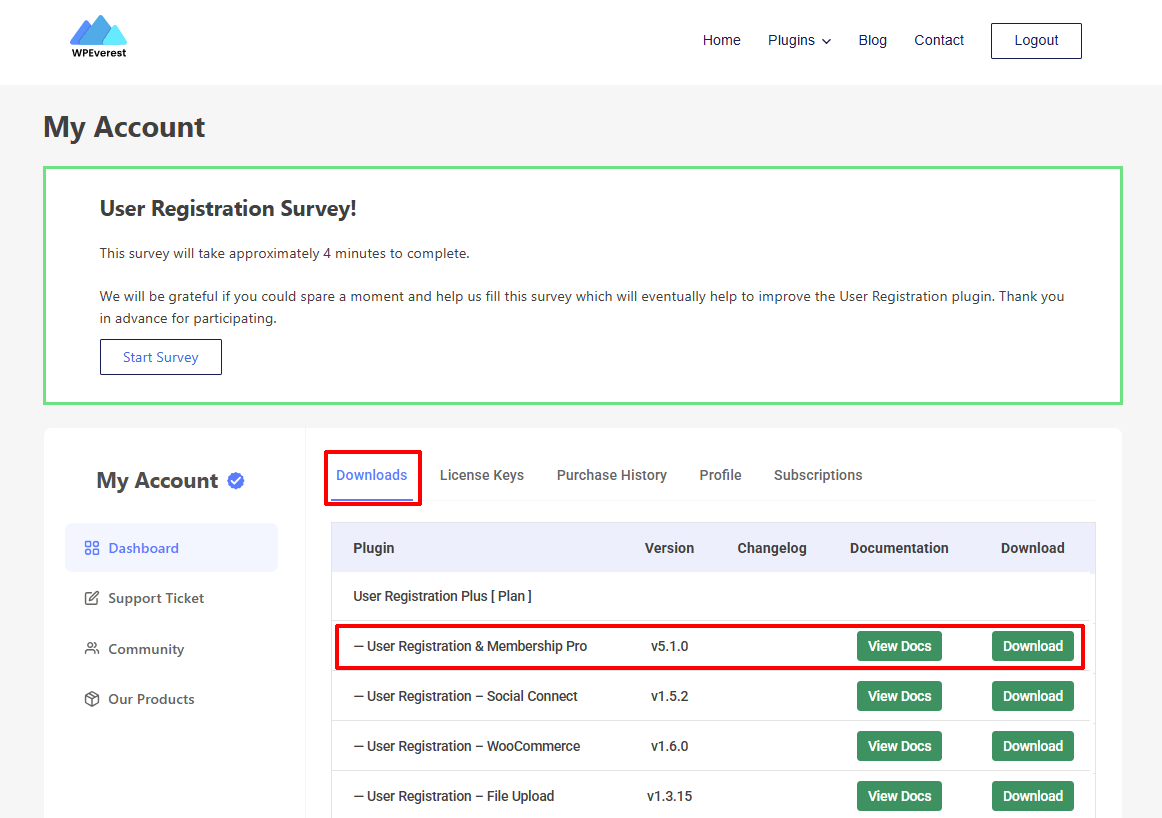
In your WordPress dashboard, go to Plugins > Add New > Upload Plugin.
Upload the .zip file, then click Install Now and Activate.
You'll see the setup dashboard. Configure the plugin and complete the setup.
User Registration & Membership Pro works on its own. You don't need the free version installed.
Step 2: Activate Your License
After activating the plugin, enter your license key to use the premium features:
In your WPEverest account, go to Dashboard > License Keys and copy your User Registration & Membership license key.
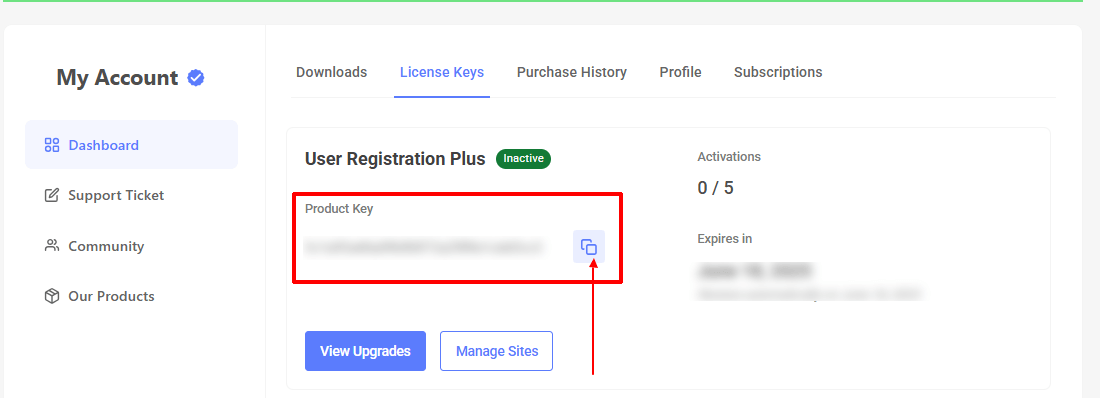
In WordPress, go to User Registration & Membership > Settings > License. You may also see a notice asking you to enter your license key; clicking it takes you to the same place.
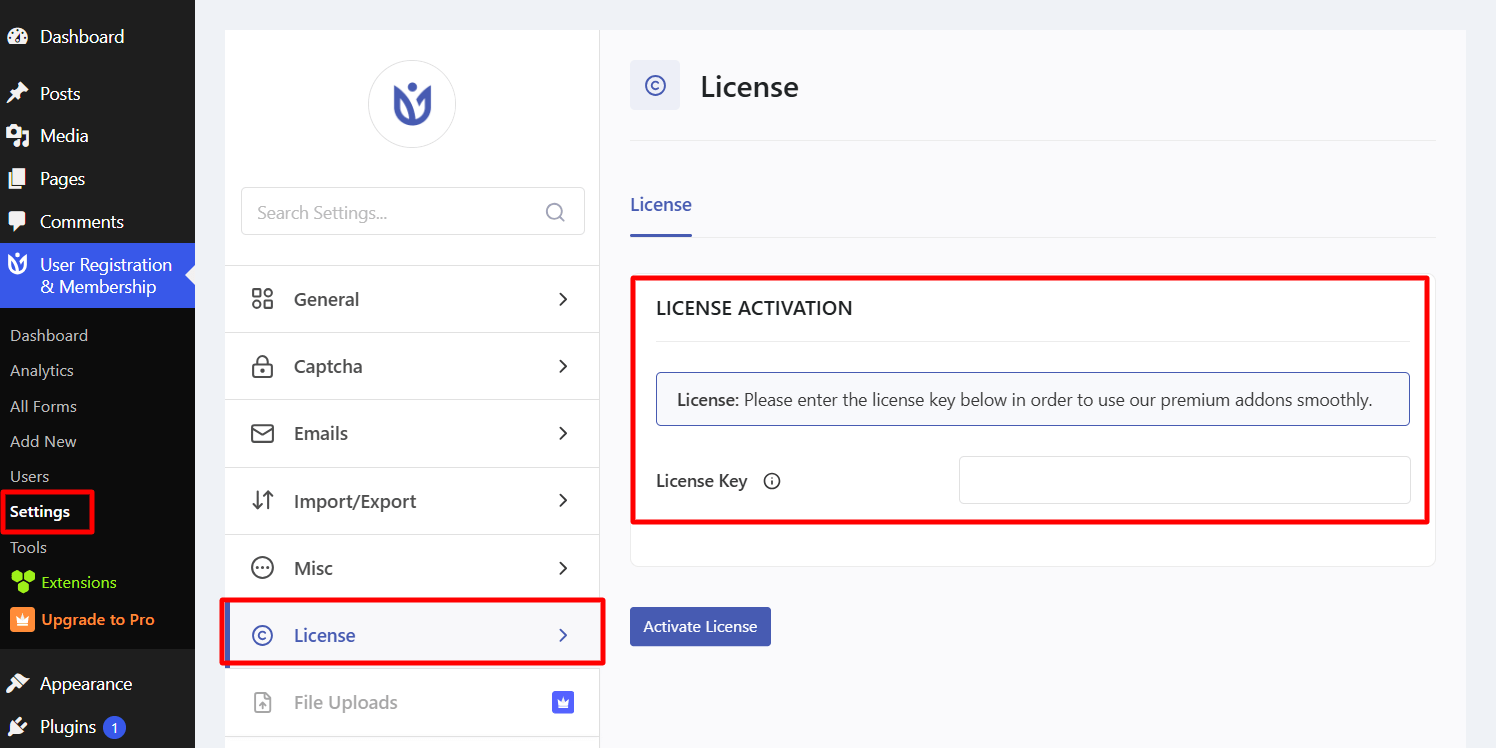
Under License Activation, paste your license key and click the Activate License button. You're all set.
Troubleshooting Tips
Install Pro Now didn't work? Use Option 2 to install the Pro plugin manually, then activate your license.
License not activating? Double-check your key in your WPEverest account.
Conflict errors? Temporarily deactivate other plugins to test compatibility.
Next Step
With Pro installed and your license active, activate the modules and addons you need, such as Advanced Fields, Stripe, or WooCommerce Integration.