
System Requirements
Outlines the minimum WordPress version, PHP requirements, and server specifications needed to run the User Registration & Membership plugin effectively.
Last updated on Jul 14, 2026
System Requirements for User Registration & Membership
To use the User Registration & Membership plugin smoothly on your WordPress site, your server and WordPress setup must meet certain minimum requirements. These requirements help ensure the plugin runs reliably, securely, and with full functionality.
Supported WordPress Version
The plugin requires your WordPress installation to be up-to-date:
✅ Your WordPress version should be 6.4 or higher.
🔎 Why this matters: Keeping WordPress updated improves security, compatibility, and performance. Many plugin features rely on the latest WordPress core functions.
How to Check Your WordPress Version
Log in to your WordPress Dashboard
Scroll to the bottom of any admin page — the version number is shown in the footer
Or go to Dashboard → Updates to see your current version and update if needed
PHP Version Requirements
PHP is the server-side language that powers WordPress. The plugin requires:
✅ PHP version 7.2 or higher.
⚠ Important: PHP versions older than 7.2 are not supported and may cause errors or lack feature support.
💡 PHP 7.2+ is recommended for:
Better speed and performance
Stronger security protections
Support for modern PHP features used by the plugin
MySQL Database Version
Your WordPress database must use:
✅ MySQL 5.6 or higher.
💡 If your host uses MariaDB, which is a fork of MySQL, make sure it's the equivalent version (typically MariaDB 10.x and above).
Recommended PHP Configuration Settings
To ensure the plugin works smoothly — especially for forms, uploads, and server tasks — these PHP settings should be configured properly:
Setting | Recommended Value | Why it matters |
post_max_size | 64M or more | Allows larger form submissions |
memory_limit | 256M or more | Lets complex scripts run reliably |
max_execution_time | 300 seconds | Prevents timeouts during processes |
upload_max_filesize | 64M or more | Supports file uploads in forms |
💡 What these do: These settings control how much data your server can handle at once, especially when users upload files, when forms process data, or when PHP scripts run longer tasks.
Required PHP Functions
Some features of the plugin rely on WordPress being able to make remote requests.
✔ WP Remote Get must be enabled on your server.
💡 If this is disabled, features like automatic updates, remote verification, or integrations may not work correctly.
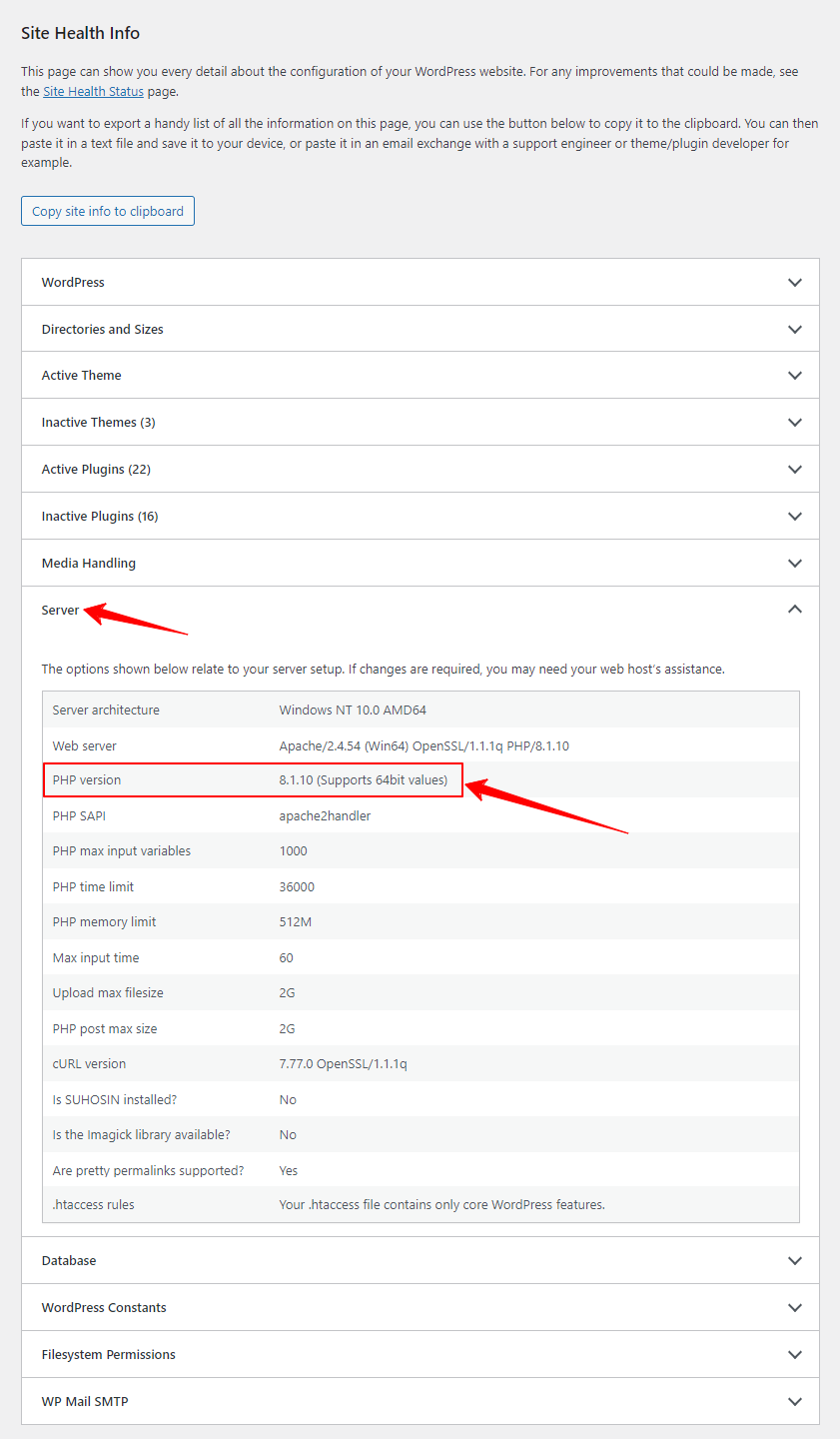
How to Check Your Server Requirements
Go to your WordPress Dashboard
Navigate to Tools → Site Health
Click the Info tab
Expand the Server section — you'll see your PHP version, database version, and other server details
👉 This page shows most of the required values (PHP version, max upload size, memory limit, etc.) so you can verify them quickly.
How to Update PHP Version (cPanel)
If your server uses cPanel, you can often update PHP yourself:
Log in to cPanel (or ask your hosting support if you don't have access)
Find and click Select PHP Version or MultiPHP Manager under the Software section
Choose a PHP version 7.2 or higher
Click Save/Apply to update it
💡 Tip: After changing PHP, check your site front-end and admin area to make sure everything looks normal.
Security Note
Using older PHP versions:
Exposes your site to security risks
May prevent the plugin from working correctly
Can lead to compatibility issues with other plugins and themes
Always aim to keep your PHP and WordPress core updated.
Summary Checklist
WordPress: 6.4 or higher
PHP: 7.2 or higher
MySQL: 5.6 or higher
post_max_size: 64M
memory_limit: 256M
max_execution_time: 300 seconds
upload_max_filesize: 64M
WP Remote Get: enabled
Final Tips
If you're not sure how to change server settings, contact your hosting provider support — they can help adjust PHP settings
Always backup your site before updating PHP or WordPress versions
After updating PHP or server configurations, revisit the Site Health page to confirm all settings are correct