
Reset the User’s Default Value in the Registration form
Learn how to add and configure a reset button in User Registration forms, allowing users to clear entered data and restore fields to their default state.
Last updated on Jul 14, 2026
Want to let users clear their registration form and start over? User Registration & Membership allows you to add a reset button that restores all fields to their default state with a single click. This tutorial will guide you through enabling and customizing the reset button for your forms.
Before You Begin
Before getting started, make sure you've installed and activated the User Registration & Membership plugin on your WordPress site. You'll also need an existing registration form to configure.
Enabling the Reset Button
To add a reset button to your registration form, go to User Registration & Membership > All Forms and select the form you want to edit.
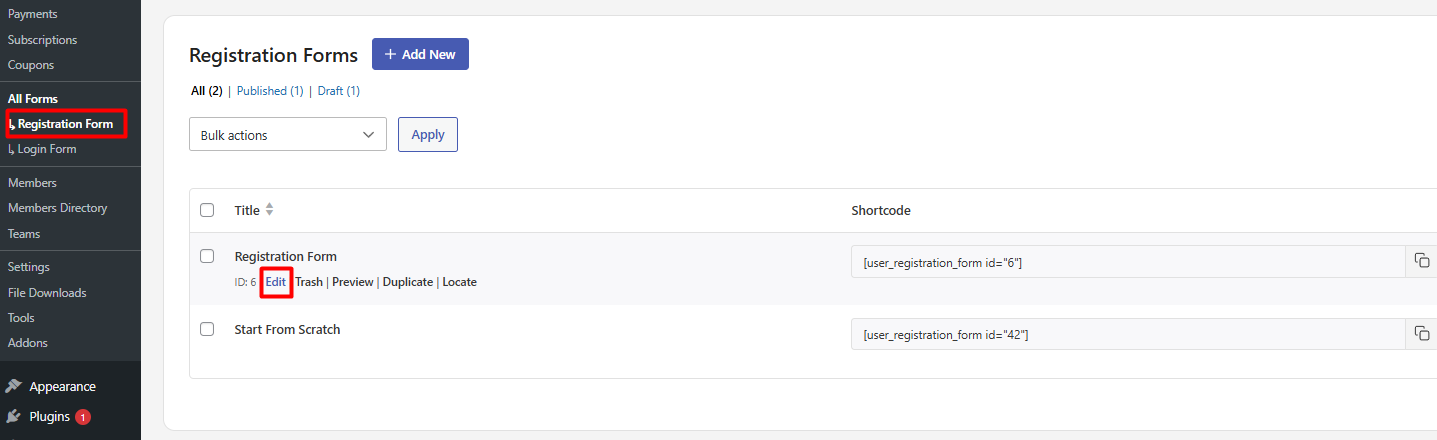
Once the form builder opens, navigate to Form Settings.
In the Form Settings panel, locate the Show Reset Button option and toggle it on. This adds a reset button to your form that allows users to clear all entered data and return the form to its original state.
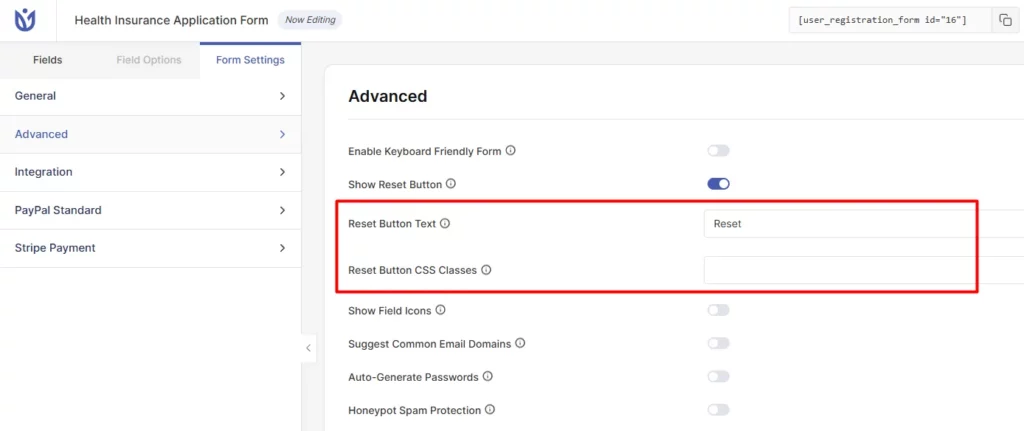
Enable Reset Button: This option allows you to reset the default values of a user in the registration form.
Form Reset Button Custom Class: This option enables you to add the Custom CSS class to embed in the reset button. You can enter multiple classes separated by space.
Form Reset Button Label: This option enables you to Set the label for the reset button.
How the Reset Button Works
When a user clicks the reset button, all form fields return to their default values. Any information the user has entered is cleared, and the form appears exactly as it did when the page first loaded. This gives users a quick way to start over without refreshing the entire page.
Frequently Asked Questions
Can I add a reset button to all my forms at once?
No, the reset button must be enabled individually for each form. This gives you control over which forms include this feature based on your specific needs.
Will the reset button delete saved data?
No, the reset button only clears the current form session. It does not affect any previously submitted or saved registration data.
Can I style the reset button differently from the submit button?
Yes, use the Form Reset Button Custom Class option to add CSS classes specific to the reset button. You can then style these classes in your theme's CSS to create a distinct appearance.
That's it! Now you know how to enable and customize the reset button for your registration forms. Next, would you like to learn more about customizing other form settings? Be sure to check out our guide on configuring form field options for all the details.