
Resend Verification Email
Manually resend verification emails to users who haven't confirmed their accounts, helping them regain access without re-registering or troubleshooting expired confirmation links.
Last updated on Aug 18, 2026
Overview
When email confirmation is required for login, users must verify their account before they can sign in. If a user misses the verification email, deletes it by mistake, or lets it sit too long, they can get stuck without access to their account.
User Registration & Membership lets you, as the site admin, manually resend the verification email to any user who hasn't confirmed their account yet, directly from the Users table. This saves you from digging through email logs or asking the user to sign up again.
What Is Email Verification?
Email verification is a security step that requires new users to click a confirmation link in their inbox before they can log in. This confirms the email address is valid and belongs to the person who registered.
Each verification link comes with a token that expires after 24 hours. If a user tries to use an expired link, they'll see a "Token Expired. Please request a new verification email" message. At that point, they need a fresh link, either by requesting one themselves from the login form, or by having an admin resend it from the dashboard.
Prerequisites
Make sure Email Confirmation to Login is enabled in your form's individual settings. Without this option turned on, accounts won't require verification, so there won't be anything to resend.
Access Path
wp-admin → Users → All UsersStep-by-Step Instructions
Log in to your WordPress dashboard.
Go to Users → All Users.
Find the user who hasn't verified their email yet.
Click the Resend Verification button next to their name.
The user will receive a new verification email with a fresh confirmation link.
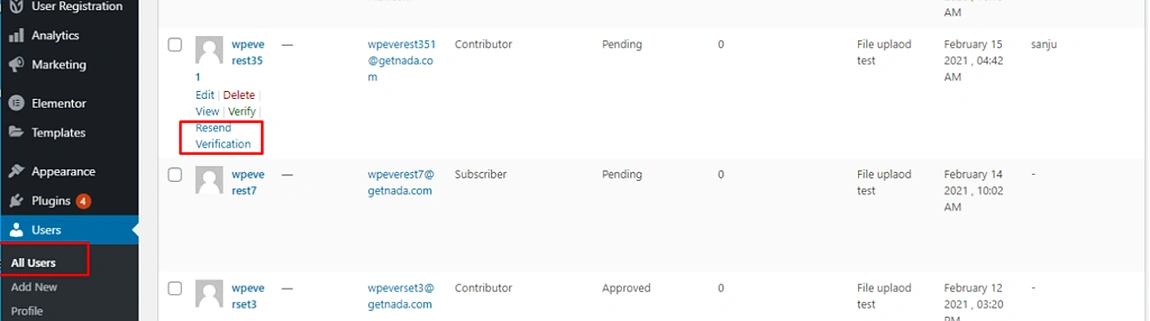
The Resend Verification button only appears for users who haven't verified their account within the last 24 hours.
Closing Section
That's it! Once you resend the verification email, the user will get a new link and can confirm their account right away. If they still don't receive it, ask them to check their spam folder, or see our guide on troubleshooting email delivery issues.