
Protect Custom URL
ProLearn how to restrict access to specific website pages using URL patterns to protect member-only content, premium areas, and downloads.
Last updated on Jul 14, 2026
The Custom URL Protection feature allows you to restrict or allow access to pages on your website based on URL patterns. This helps you protect member-only areas, premium content, downloads, or internal sections of your site. This guide starts with simple rules and gradually moves to advanced use cases.
Before You Start
Before creating Taxes, make sure:
The User Registration & Membership Premium plugin is installed and activated
Content Restriction add-on is activated (Optional)
Applying Custom URL Protection
Method 1: Via Membership
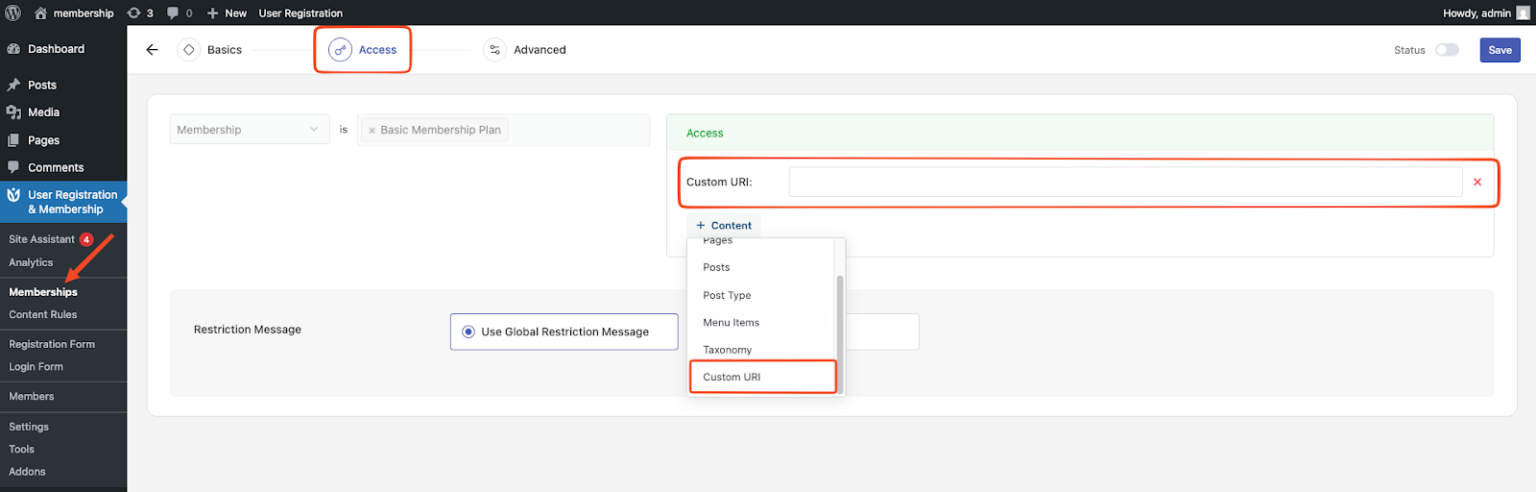
Navigate to: Dashboard → User Registration & Membership→ Membership
Either: Edit existing: Click "Edit" on [Membership Plan Name] OR Create new: Click "Add new"
Once in the plan settings, go to the Access tab
In the rule editor, locate the "Content" dropdown/button, click to expand the dropdown options, and select "Custom URI" from the menu
Enter your URL patterns
Method 2: Via Content Restriction Module (Optional)
Enable the Content Restriction Module
Configure Content Rules
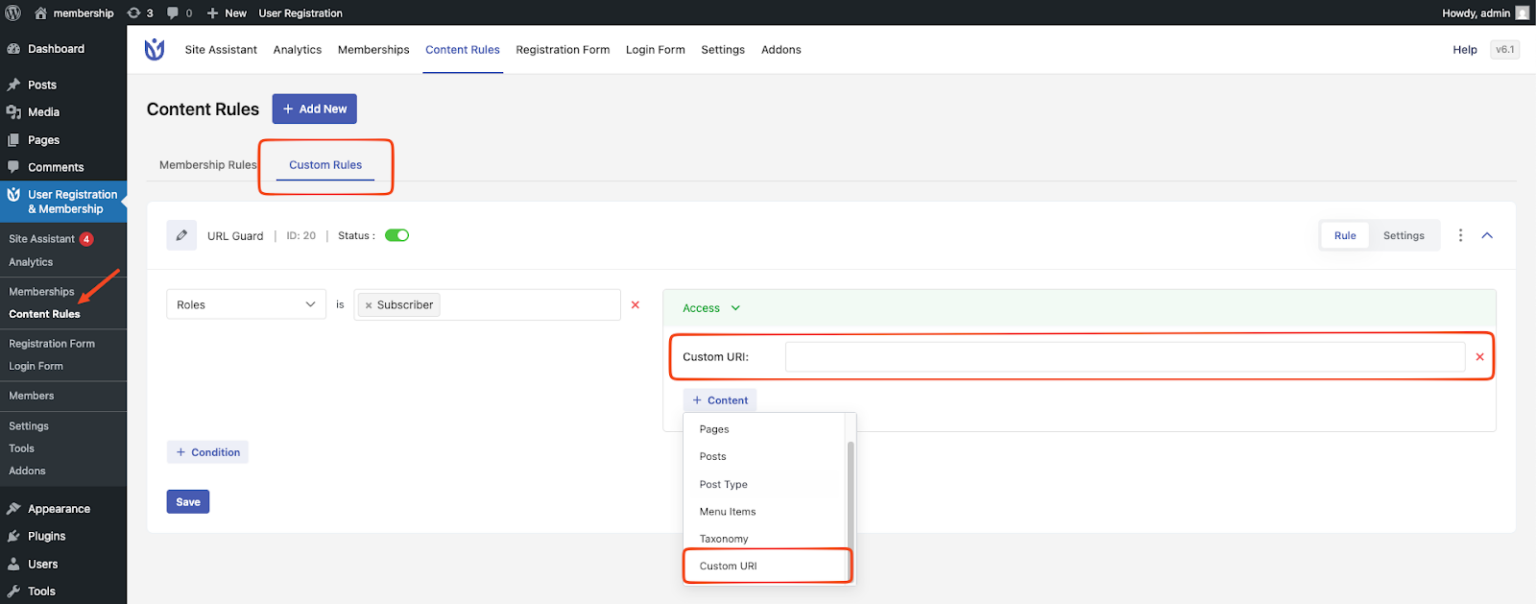
Go to: Dashboard → User Registration & Membership→ Content Rules
Select the "Custom Rules" tab
Either Create New Rule or Edit Existing
In the rule editor, locate the "Content" dropdown/button, click to expand the dropdown options and select "Custom URI" from the menu
Enter your URL patterns
How URL Matching Works
When a visitor opens a page, the system looks only at the path portion of the URL.
Example:
https://example.com/blog/my-post/?ref=twitterThe system checks:
/blog/my-post/Important notes:
Domain name is ignored
Query strings are ignored
URL fragments are ignored
Trailing slashes are respected as part of matching
Basic Pattern Rules
Exact Path Match
Use this when you want to restrict only a specific page.
/page/Matches:
https://example.com/page/
https://example.com/a/page/
Does not match:
https://example.com/page/test/
https://example.com/page-test/
Wildcard Patterns
One-Level Match (/*)
/page/*Matches only the direct child pages under /page/.
Matches:
/page/a/
Does not match:
/page/
/page/a/b/
/page-test/
Use this when you want to restrict only second-level pages.
Section Match (/**)
/page/**Matches the page itself and all of its subpaths.
Matches:
/page/
/page/a/
/page/a/b/
This is the recommended pattern for protecting an entire section.
Prefix-Based Matching (Advanced)
Keyword Prefix Match (*)
/page*Matches any URI that starts with /page.
Matches:
/page
/page/
/page-test/
/page123/
Does not match:
/my-page/
/a/page/
⚠️ Use with caution — this pattern can match more pages than expected.
Broad Prefix Match (**)
/page**Matches all variations of /page and all their subpaths.
Matches:
/page/
/page-test/
/page123/
/page/a/
/page-test/a/b/
This is the broadest pattern and should be used only when intentional.
Pattern Summary Table
Pattern | Matches |
/page/ | Exact page only |
/page/* | One level under /page/ |
/page/** | /page/ and all subpaths |
/page* | Any URI starting with /page |
/page** | Any /page variation and all subpaths |
Common Use Cases
Protect a Single Page
/account/Restricts only the account page.
Protect Only Direct Child Pages
/courses/*Restricts:
/courses/101/
/courses/advanced/
Allows:
/courses/
/courses/advanced/lesson-1/
Protect an Entire Section
/members/**Restricts:
/members/
/members/profile/
/members/downloads/file.pdf
Protect Pages That Start With a Keyword
/promo*Restricts:
/promo
/promo-2024/
/promo-special/
Protect All Variations and Subpaths
/promo**Restricts:
/promo/
/promo-old/
/promo/a/b/
Combining Multiple Patterns
Use the | character to apply OR logic.
/members/ | /premium/ | /vip/**If any pattern matches, access is restricted.
Excluding Pages (Negation)
Allow Specific Pages Inside Restricted Areas
Use ! to exclude a page from restriction.
/members/** | !/members/free-trial/Restricts everything under /members/
Allows /members/free-trial/
Best Practices
Always start patterns with /
Prefer /page/** for section-level protection
Use /page and /page* carefully
Test patterns before publishing
Testing Checklist
Before saving your rule:
List URLs that should be restricted
List similar URLs that should remain accessible
Test both cases manually
Example:
Pattern:
/members/**URL | Expected Result |
/members/ | Restricted |
/members/profile/ | Restricted |
/membership-info/ | Allowed |
Quick Reference
/page/      → Exact page
/page/*     → One level only
/page/**    → Page + all subpaths
/page*      → Prefix-based match
/page**     → Broad prefix + subpaths