
Cancel Subscription
Step-by-step guide to canceling your plugin subscription, including information about automatic renewals, reminder emails, and accessing subscription settings in your account.
Last updated on Jul 14, 2026
By default all our plugins are subscription based. Once purchased you will be automatically charged for the next year on the discounted price as per mentioned in the plugin pricing page.
However, before charging for the renewal we do send you a reminder email one a month before the renewal data and another a week ago.
If you wish to cancel your subscription and no longer want to continue with the product then you can simply follow the steps.
First login to your account page with the email and password you setup during the purchase of the product.
Once logged in simply visit the Subscription Tab on your account page. You will find all the previous payment details.
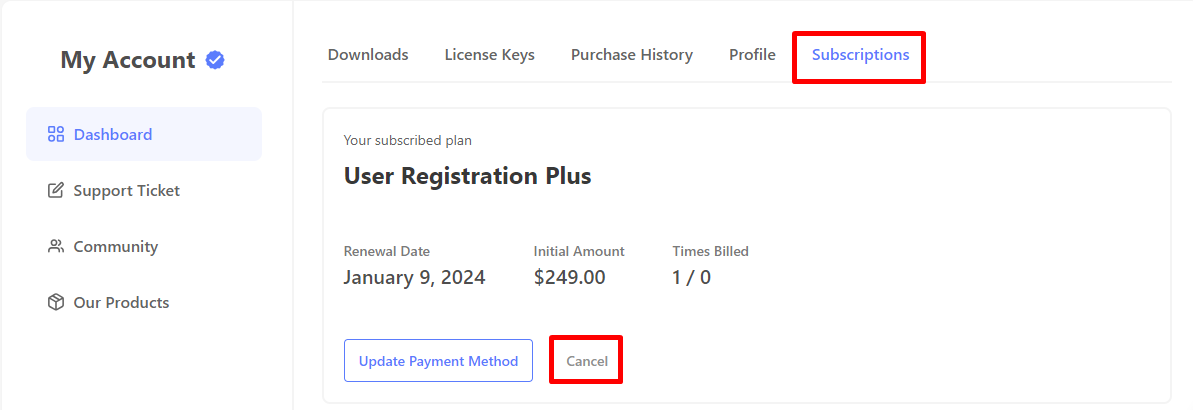
Simply click on the Cancel Button on the currently active subscription.
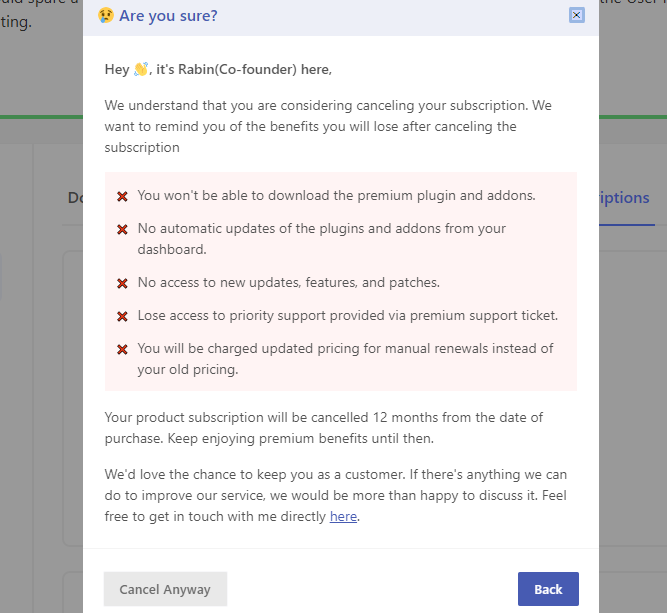
A popup will appear to confirm that you wish to proceed with the cancellation. Simply click the Cancel Anyway button and your subscription will be cancelled.
After canceling the subscription, a ‘Cancelled‘ notice will appear next to the plan name.